Home Blog Page 4

Voot Videos Download Kaise kare | How To Save Voot Videos in Hindi

0

Dosto aaj me apko voot video apne mobile or leptop me voot video download kaise karte hai uske bareme batauga. 3 method batauga jisse aap asani se voot video download kar sakhoge. website or android apk dono tarikhe se voot video download karna sikhauga.

How to increase WhatsApp Forward Limit in Hindi

How To Save Voot Videos – Voot video save Trick.

  1. Website se voot video download karna Sikhe.
  2. 1DM Apk Se Video Download karna Sikhe.
  3. Videoder Apk Se Video Download karna Sikhe.

1. Website se voot video download karna Sikhe.

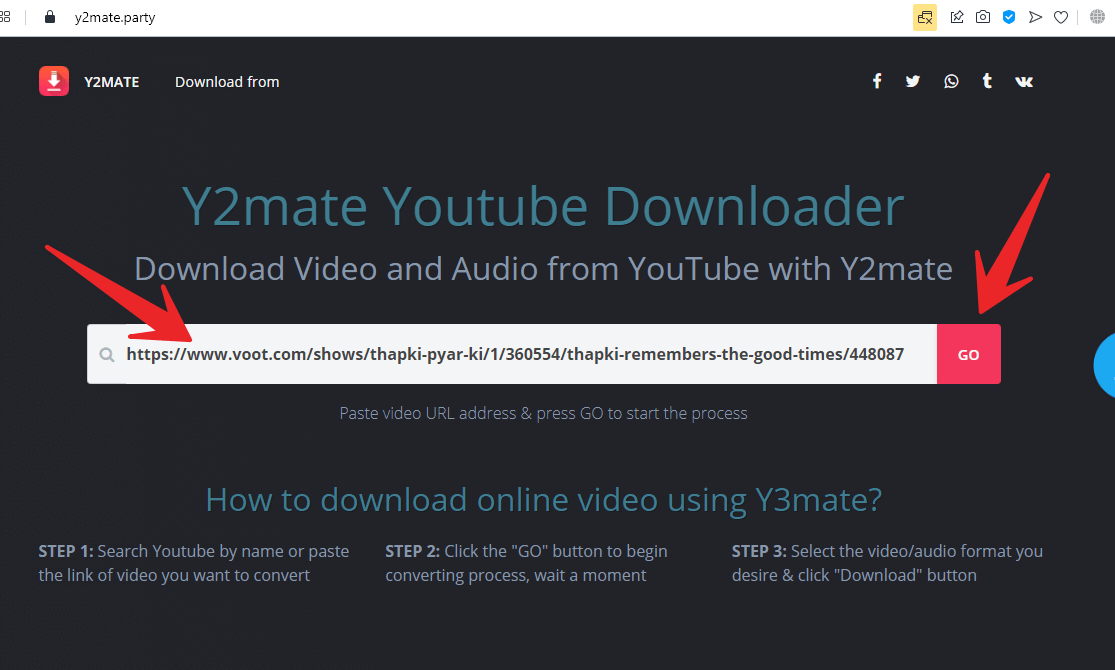
Jiss voot video ko download karna chahte ho ussi link ko coppy karo or Niche website ki link diya usse open kare. website open karne ke baad apko website me chota sa box me voot video link past karke Go par click kardo.

Website Links:

Go Par click karne ke baad loading hona suru ho jayega. loading hone kuch second lagega. loading ho janee ke baad aap jis Quality me video download karna hai uss Quality ke baju download button par click kar ke video ko download kar lijye.

Mobile Apk Se Voot video download karna sikhna hai to iss article ke niche jaye.

Also Read : Facebook Pe Date Of Brith Change Kaise Kare ?

2. 1DM: Apk Se Voot Video Download karna Sikhe.

Sab Se Pehle Play Store Se 1DM Apk Download karke install kare.

Play Store IDM APK Link : https://play.google.com/store/apps/details?id=idm.internet.download.manager

Download and install ho jane ke baad 1DM apk open kare.
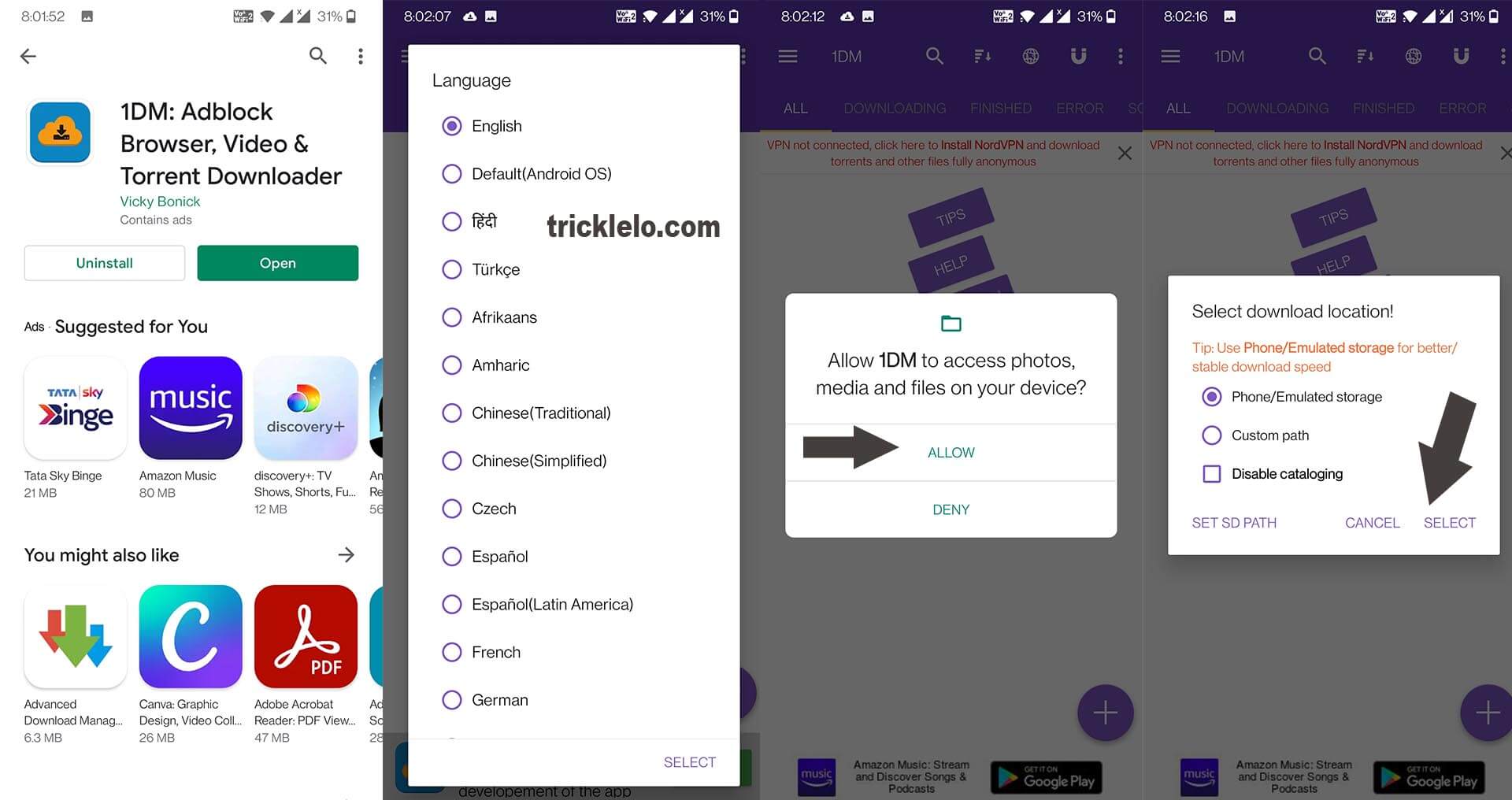
Language : Jis Language me 1dm apk karna uss Language ko select kare.

Allow 1DM to access photos,media and files on your device?
Allow Par click kare.

Select Download Location : Phone/Emulated storage select kare.

Do you want to create browser shortcuts for quick and easier access?
Agar aap 1DM shortcuts Rakhna Chahate hai to Yes Create par click kijye agar nahi chahte to Cancel par click kijye.

Uske baad Top me 1dm Browser Ka icon hoga uspe click karna hai.

information : checkout accessibility settings for adding shoertcuts and gestures to 1DM Browser for faster access.
cancel par click kijye.

uske baad apko https://www.voot.com website open karke login kare. login ho jane ke baad apko jis video ko download karna hai usse open kare. uske baad top baar me download ka icon hoga uspe click karo.

note : ad jane ke baad apko download icon par click karna hai. [ad jane ke baad kuch second wait karye]
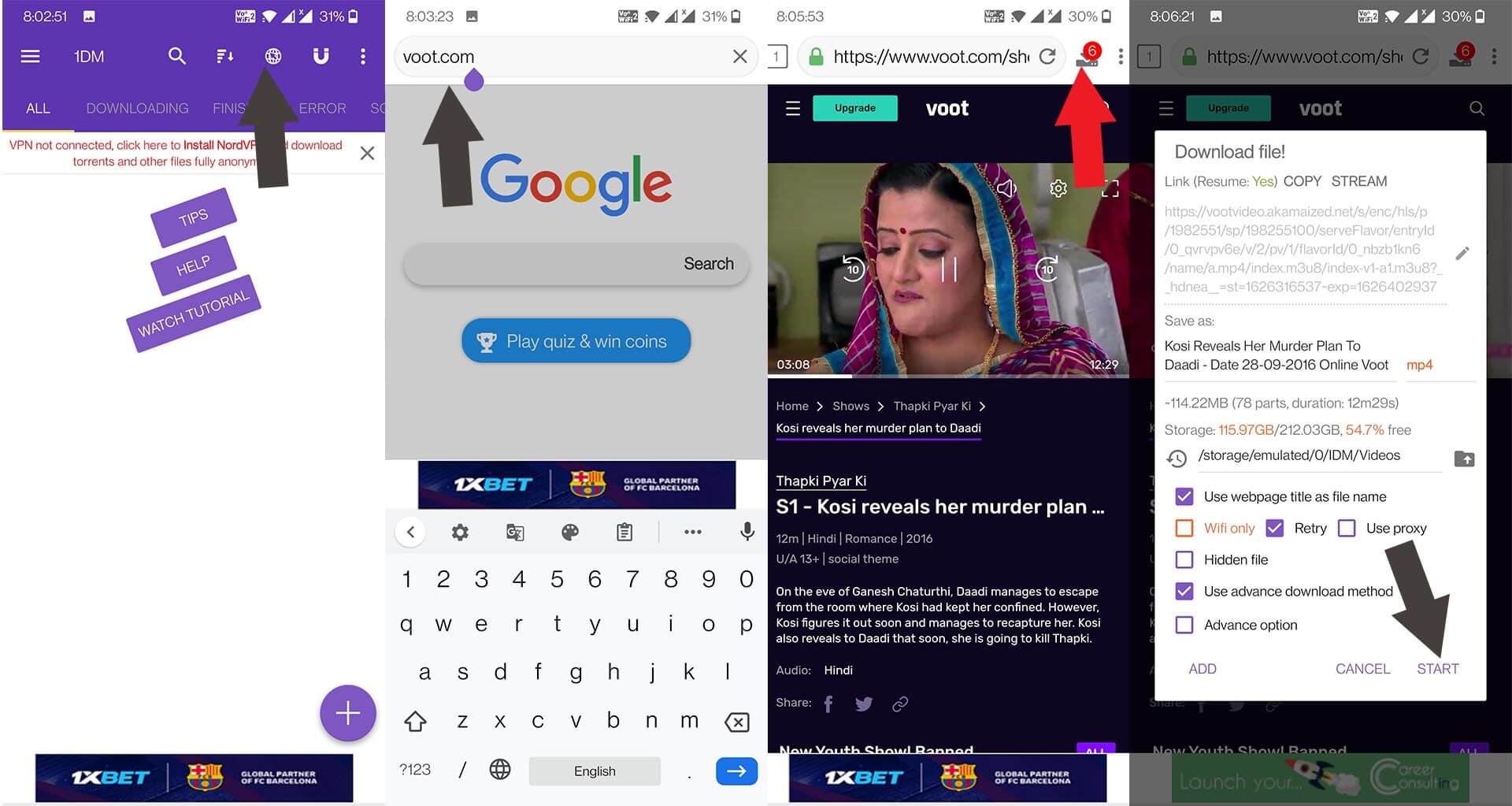
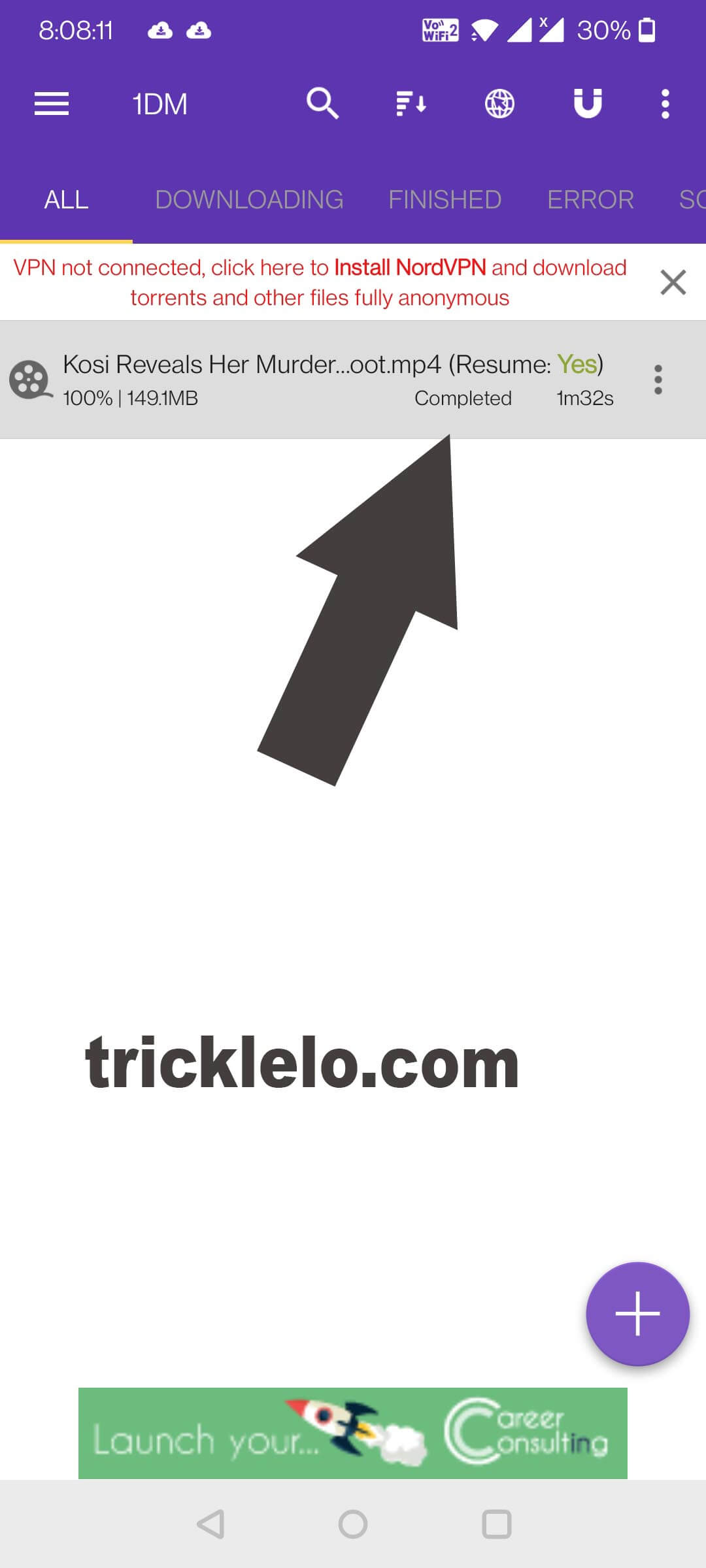
uske baad apko jis qulity me video download karna hai uspe click karna hai. uske ek baad start par click karna hai. apka video download hona suru ho jayega.
3. Videoder Apk Se Video Download karna Sikhe.

Sab Se Pehle Videoder Apk apne mobile me install kijye.

Videoder Apk Link : https://www.videoder.com/download/videoder-for-android

Videoder apk open karne keed “5 Number” pe voot ka icon hoga uspe click kare. website open hone ke baad voot par login karna hai. uske baad apko jis video ko download karna hai usse open kare. uske baad footer me apko download icon dikhega us par click kare. uske baad kuch second me video ki download link generat ho jayega. uske baad jis qulity me video download karna uspe click kar dijye apka video download hona suru ho jayega.
Facebook Par Mobile Number Hide Kaise Kare ? 

MeWe Group Link Change Kaise Kare ?

1

Dosto Aaj Me apko mewe group url kaise change karte hai uski jankari share karne wala hu. 2 method se batauga apko kaise aap mewe group link change kar sakhte hai.

How to Change Mewe Group Link in Hindi ?

  1. Android App Se MeWe Group Link Change Karna Sikhe ?
  2. www.mewe.com Website Se MeWe Group Link Change Karna Sikhe ?

Android App Se MeWe Group Link Change Karna Sikhe ?

1 ) Sab Se Pehle MeWe App Download & Install kare.

2 ) MeWe Par Account banaya hua hai to aap login kijye agar aapne MeWe par account nahi banaya hai to sign up par click kijye.

3 ) MeWe Account Login Hone Ke Baad Sabse niche aapko 5 ICON Dikhega.

  1. Home
  2. Communities
  3. Chats
  4. Notifications
  5. More

Dusre Number par Communities Ka ICON hoga uspe click karna hai. Communities me aap jitene bhi group me add hoge utne group dikhay dege.

Ab Apko apne Owner [ admin ] wala group open karna hai.

4 ) Group Open Karne Ke Baad Top Par Search Icon ke pass About ka icon hoga uspe click kijye.

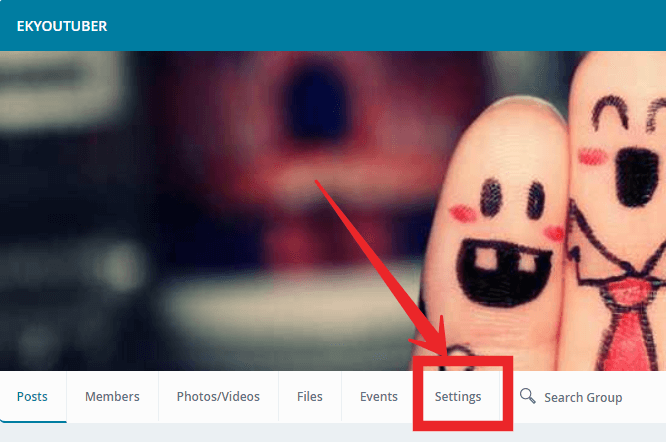
4 ) Group Setting Par Click Kare.

5 ) How Members Join Par Click Kare.

5 ) Group Link Par Click Kare.

6 ) Group Ka Username Jo Rakhna Hai Vo Likh dijye and save par click kar dijye apke Group Ka URL Change Ho Jayega.

www.mewe.com Website Se MeWe Group Link Change Karna Sikhe ?

1 ) Sabse Pehle MeWe Group Open Karo Jispe Aap Group Ka Owner (Admin) Hai.

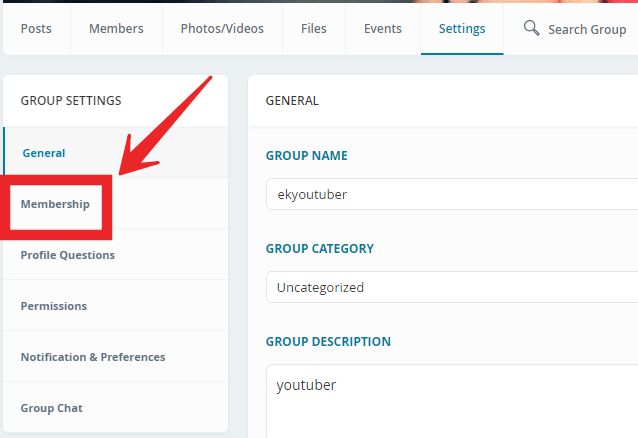
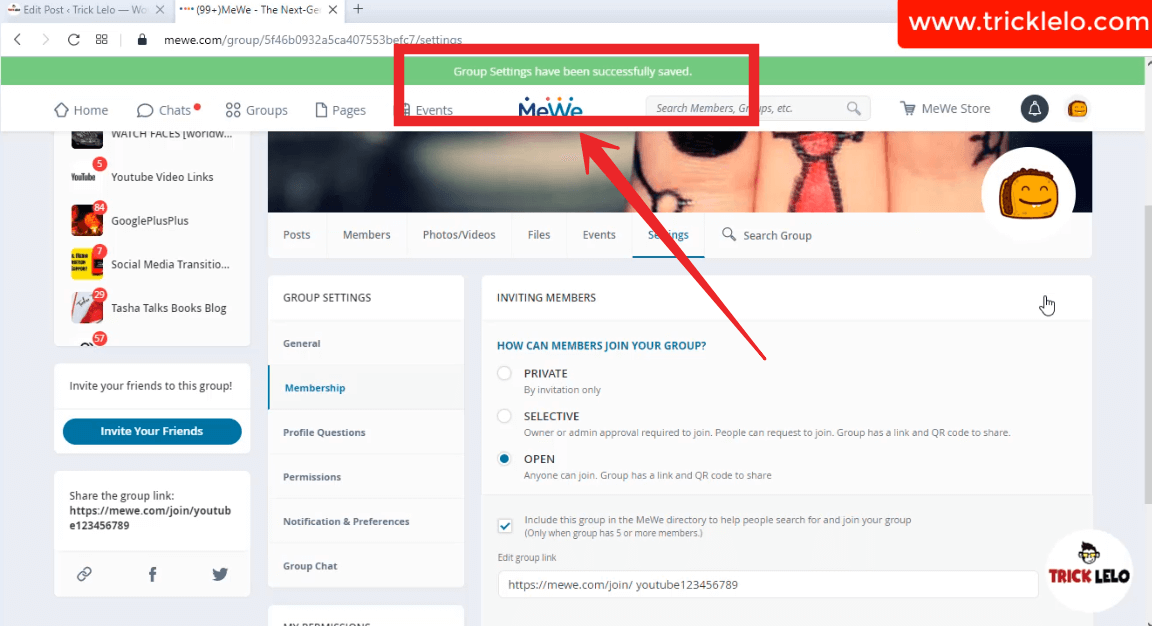
2 ) Group Open Karne Ke Baad Group Settings me jaye.

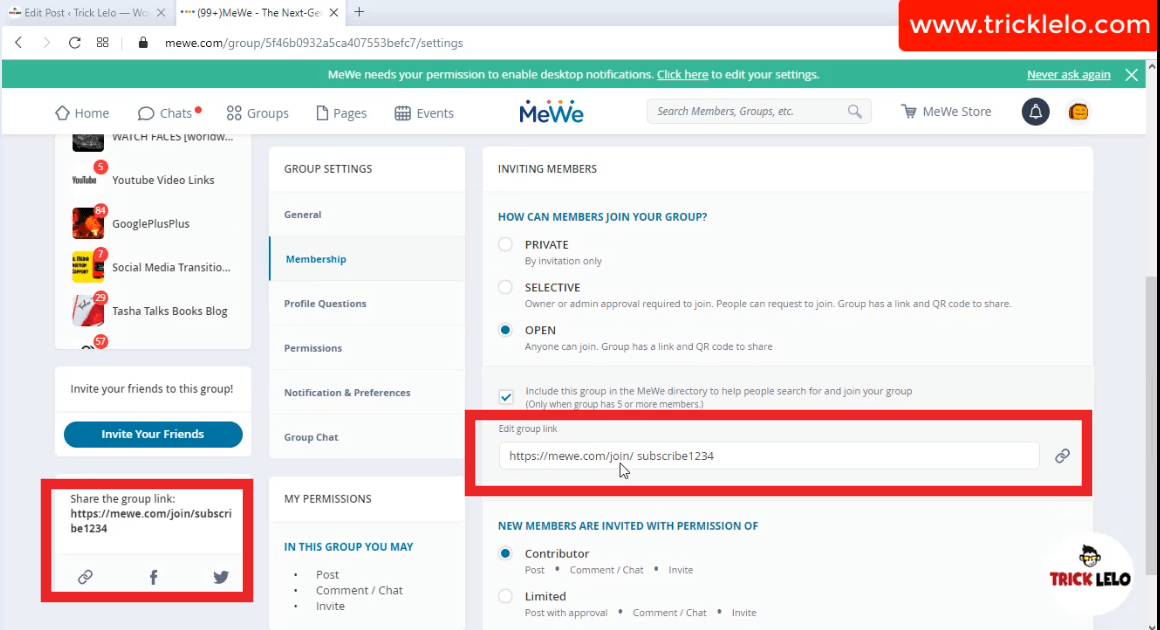
3) Group Settings Me Aapko Membership Par Jana Hai.

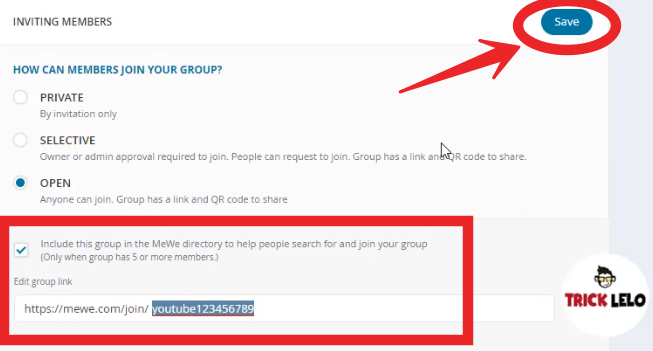
4 ) 

5 ) ab apko save par click kar dena hai.

Group Settings Have Been Successfully Saved. apka page ko refresh karo apke group ki link change ho gya hoga.

[YouTube Video] How To Change MeWe URL For Group

apne dosto ko share kare. Thank You !

Blogger Par Free Blog Kaise Banate hain – TrickLelo

0

Dosto Aaj Main Aapko Bataunga Website or Blog kaise Banate hai. Agar Aap chahte ho ki hum apna ek website or blog banaye, jiski madad se internet par online business start karna chahte hai ya apke pass koi aisi knowlage hai jisko Puri duniya ke sath share karna chahte hai to blogging bahut acha tarika hai.

Website [Blog] Kaise Banate Hai – Step By Step in Hindi 

Agar aapki pehle se hi Google ya Gmail par id hai to aapko blogger par id banane ki koi jaroorat nahi padegi.
Blog banane ke liye kin kin chijoo ki jarurat hoti he? 

  1. Computer / Andriod Mobile
  2. Gmail Account
  3. Internet

 How To Create Free Blog?? 

 Step 1 

Sab Se Pehle https://www.blogger.com  Website par jaye Or Gmail id se Login Karo.

 Step 2 

New Blog ke button par click karte hi ek naya Box open hoga.

 Step 3 


Is box me apne blog ki details bhare ;-

Title ;-  Apne blog ka Title dale.

Address  ;- Es mein blog ka address yani blog ka Url dena hai jo pahle kisi ka na ho. ex. tricklelo.blogspot.com

Template ;- Niche diye gaye template mein se kisi ek ko choose kare.

Create Blog ;-  Upar ki sabhi fields poori hone ke baad Create blog par click kare.
Ab aapka naya blog ready ho gaya hai. Ready hone ke baad jo page aapke saamne khulta hai use hum dashboard kehte hai.

Dashboard ;- Ek aisa page hai jaha se hum apne website ko control karte hai. Ye page sirf jiski website hai usi ko dikhta hai doosre logo ko sirf website ka front hi dikhta hai. Aap dashboard se apne blog par khuch bhi daal, hata ya badal sakte hai.

thank you for visiting my website

Blogger Blog Ka Template Kaise Change Kare ?


Blogger Blog Ka Template Kaise Change Kare ? TrickLelo

0

Blogger Blog Ka template Kaise Change Kare Hindi

Template Kaha Se Download kare??

Google par aise bahut website he jaha se hum Blog ke liye template Free me Template Download kar ke usko Blog Par upload Kar sakte hain.kuch website ka name bata deta hu jaha se aap free me blogger template download kar sakte hain.

  1. https://gooyaabitemplates.com
  2. https://btemplates.com
  3. http://www.soratemplates.com
  4. http://www.bloggertheme9.com

 How To Change Your Blogger Blog Template? 

Step-1:-  sab se pehle aap ka pasand ka koi bhi ek blogger template Download kare.

Step-2:-  Template  zile file me Download Hoga. template ko unzip kare. File format that you have downloaded is may be a .ZIP file. so need to be extracted. Please Extract / Unzip it. 

Step-3:-  Login Your Blogger Account

Step-4:-  Uske Baad Blogger Dashboard me Template option Par Click Kare

Step-5:-  Look at the top right corner, you will see Backup / Restore button
” Before doing this, Please backup your previous template because, if you have any problem after  uploading the new template, the backup file will help you for restore. Please Read the post about Backup and Restore in Blogger ”

Step-6:- Manage on pop-up windows and click “choose file” button and look for folder that is created after extracted file that you have downloaded.

Step-7:- Folder may has a .XML file and .TXT file or Internet shortcuts, you should select only XML file.

Step-8:- Click Upload button. Now upload process  may appear in your screen.

Step-9:- Done, Template Installed successfully Enjoy.

Blogger Par Blog Kaise Banate Hai – Step By Step in Hindi

 Whatsapp Par Deleted Messages Kaise Padhe ? Whatsapp Trick

Aaj ki post me hum aap ko batayege Whatsapp par delete kiye gye message ko kaise padhe.dosto apne kabhi whatsapp par kisi friends,family members or girlfriend ko galati se galat message send kar diye ho or apko uss messages ko Pehle aap delete nahi kar sakte the.lekin dosto aaj aeshe secret whatsapp trick leke aya hu me jinki madad se aap sabhi whatsapp par delete messages ko asani se padh sakte hain.

How to Read Deleted WhatsApp Messages ??

whatsapp apne users ke liye new new features provide kar raha hai or apne users ki sankhiya badhane ke liye new new feature lata rehta hai.whatsapp ne ek new feature Whatsapp me add kiya hai.uss feauture ka name delete everyone hain. whatsapp me send kare huae messages ko 7 miniuts ke andar delete karne ke kiye whatsapp ne delete everyone ka features diya gya hai.

WhatsApp Forward Limit kaise increase kare ?

dosto india me aaj ke jamane me har chij ka juggad mil jata hai. to chaleye dosto hum aap ko batayege kaise delete kiye gye messages ko padh sakte hai.

 Whatsapp Par Deleted Messages Kaise Padhe ?? 

 Step 1  Sab Se Pehle Aapko GBWHATSAPP download Download karna hoga. gbwhatsapp download karne ke liye niche diye gye link ko open kare.

 Step 2  GBwhatsapp download and install complate hone ke baad mobile number dal kar Whatsapp Account bana lo. Gbwhatsapp open karoge to apko uper … dot ka icon hoga waha par click kare.

Step 3  uske baad aap ko privacy option me jana hai. last me aap ko Enable Anti-Revoke Option par click kar ke Enable kar dijye.

Enable Anti-Revoke ;-

Dosto GBWhatsapp ne new feauture add kiya hai jiska name Enable Anti-Revoke hai. Enable Anti-Revoke se aap kisi bhi friends ne messages deleted kiya hai to aap aasani se uss messages ko padh sakte ho. Enable Anti-Revoke par click karke aap Enable kar dijye.

dosto disable feature se aap deleted messages ko padh nahi sakte hain.agar aap delete messages ko nahi padhna chate hain to aap disable anti-revoke feauture ko disable kar sakte hai.

dosto Anti-Revoke Feaure Se Aap Delete Messages Aaram se padh sakte ho. post achi lage to like commnets jaruru kare.


How to increase WhatsApp Forward Limit in Hindi | WhatsApp Forward Limit kaise increase kare ?

How to increase WhatsApp Forward Limit in Hindi | WhatsApp Forward Limit kaise increase kare ?

1) Sab Se Pehle Apko GBWHATSAPP, FMWHATSAPP, YOWHATSAPP Letest Version Download Karna Hoga.

GBWHATSAPP, FMWHATSAPP, YOWHATSAPP Me se Koi Bhi Ek WhatsApp Download Kar Lijye.

How to Read Deleted WhatsApp Messages on Andriod

2) Download Karne Ke Baad Install Kare & apna Number Daalke Account Create Kar Lijye.

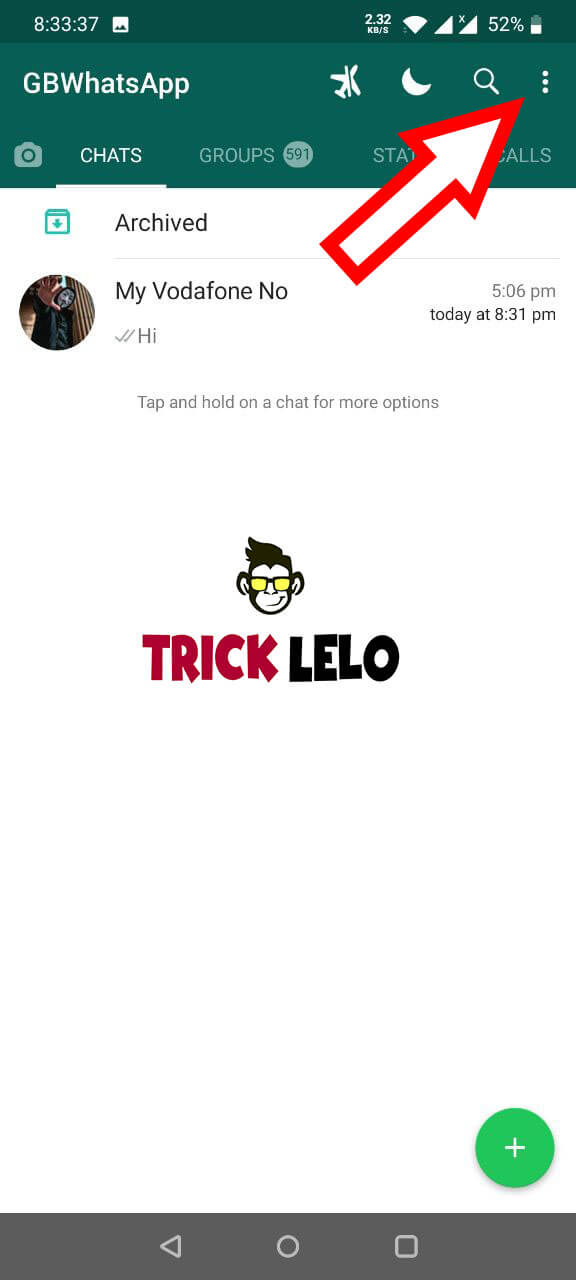
3) Uske Baad Apko Top Bar Me ( Three Dot ) … Three Dot Dikay Dega Uspe Click Kare.

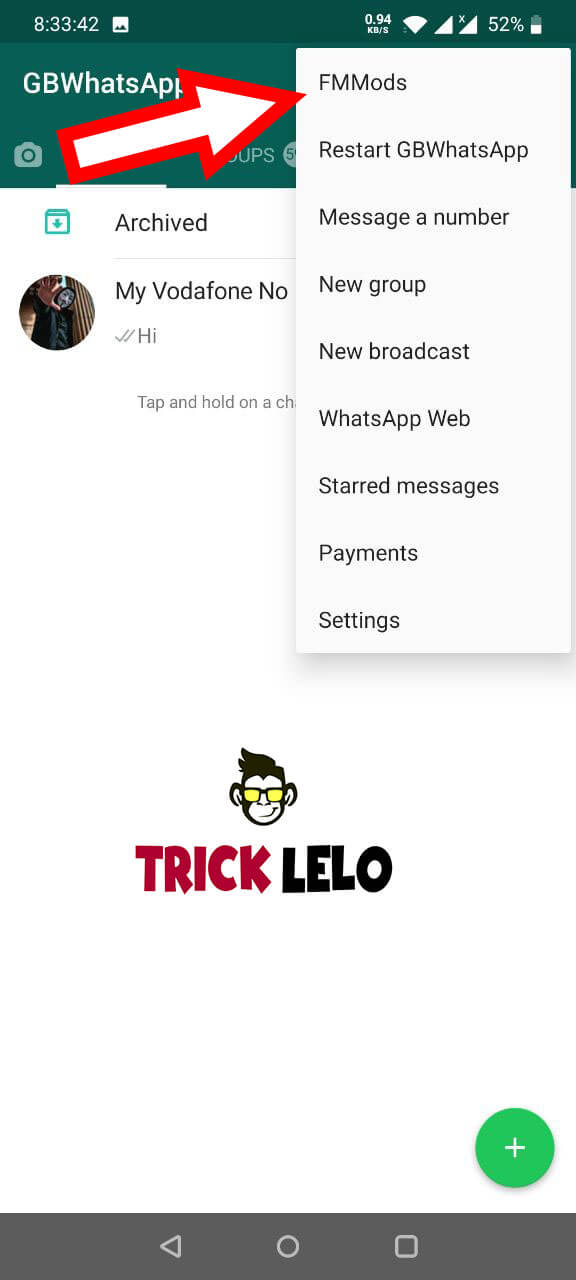
4) Uske Baad First Option Me FMMods Likha Hoga Uspe Jana Hai.

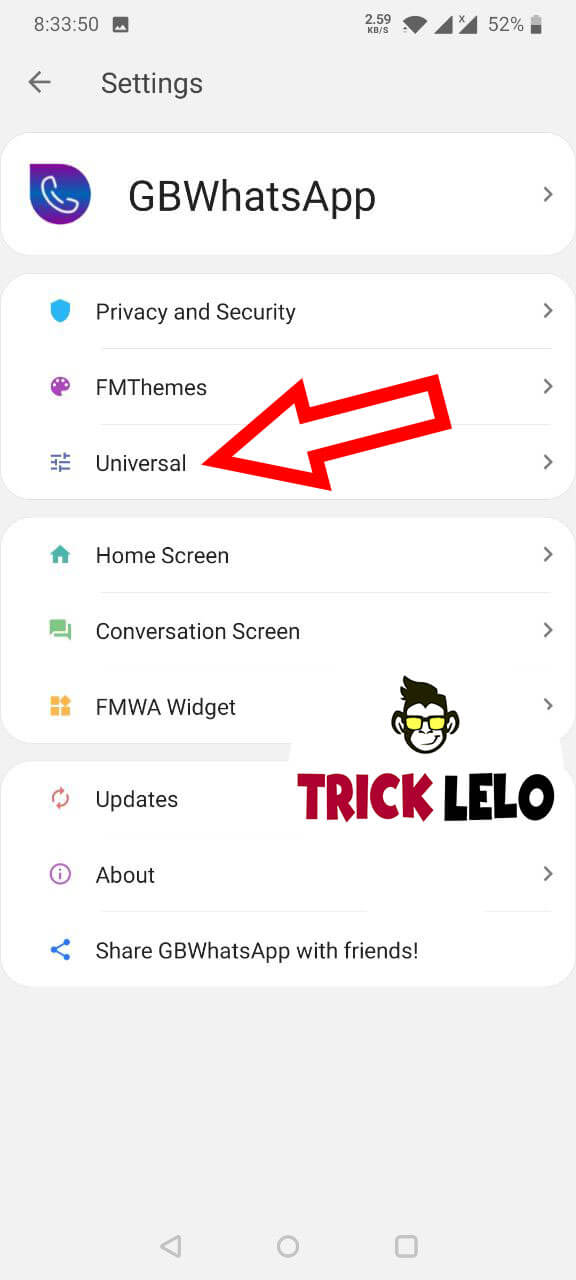
5) Uske Baad Universal Par Click Kijye.

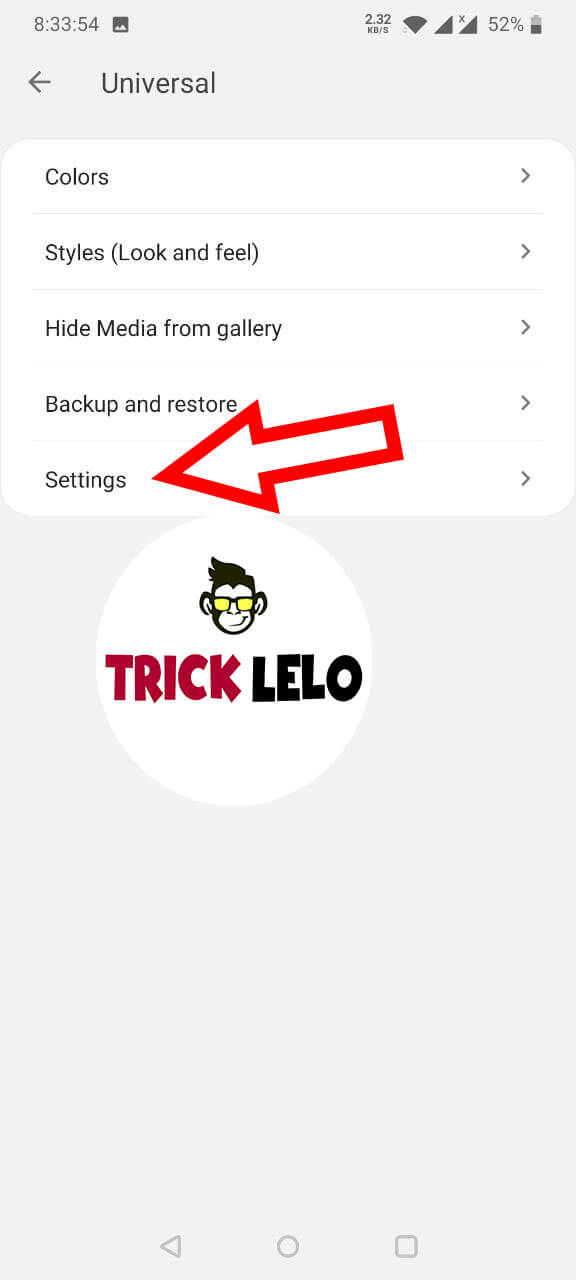
6) Setting par Click Kijye .

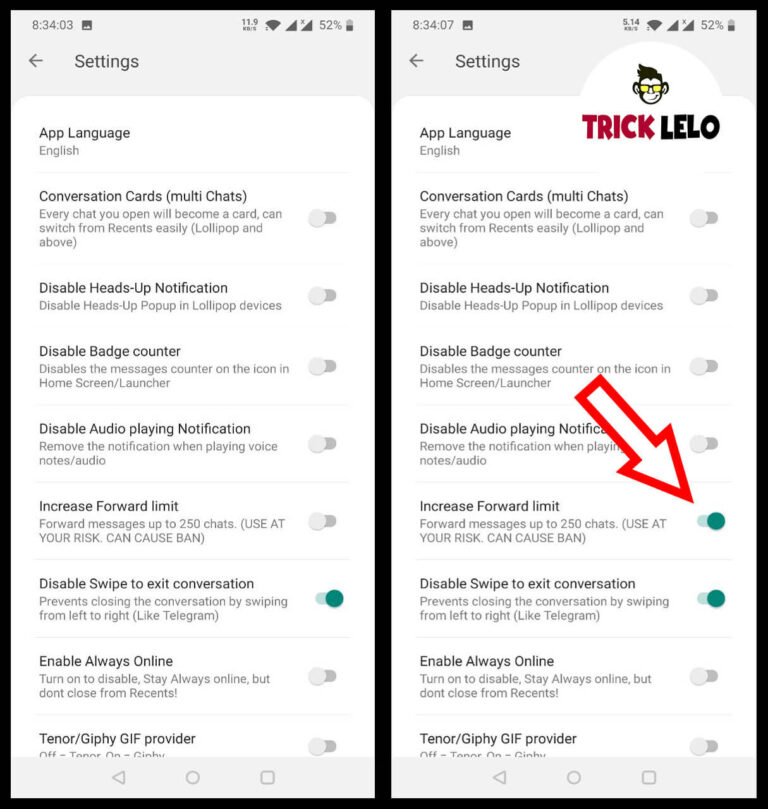
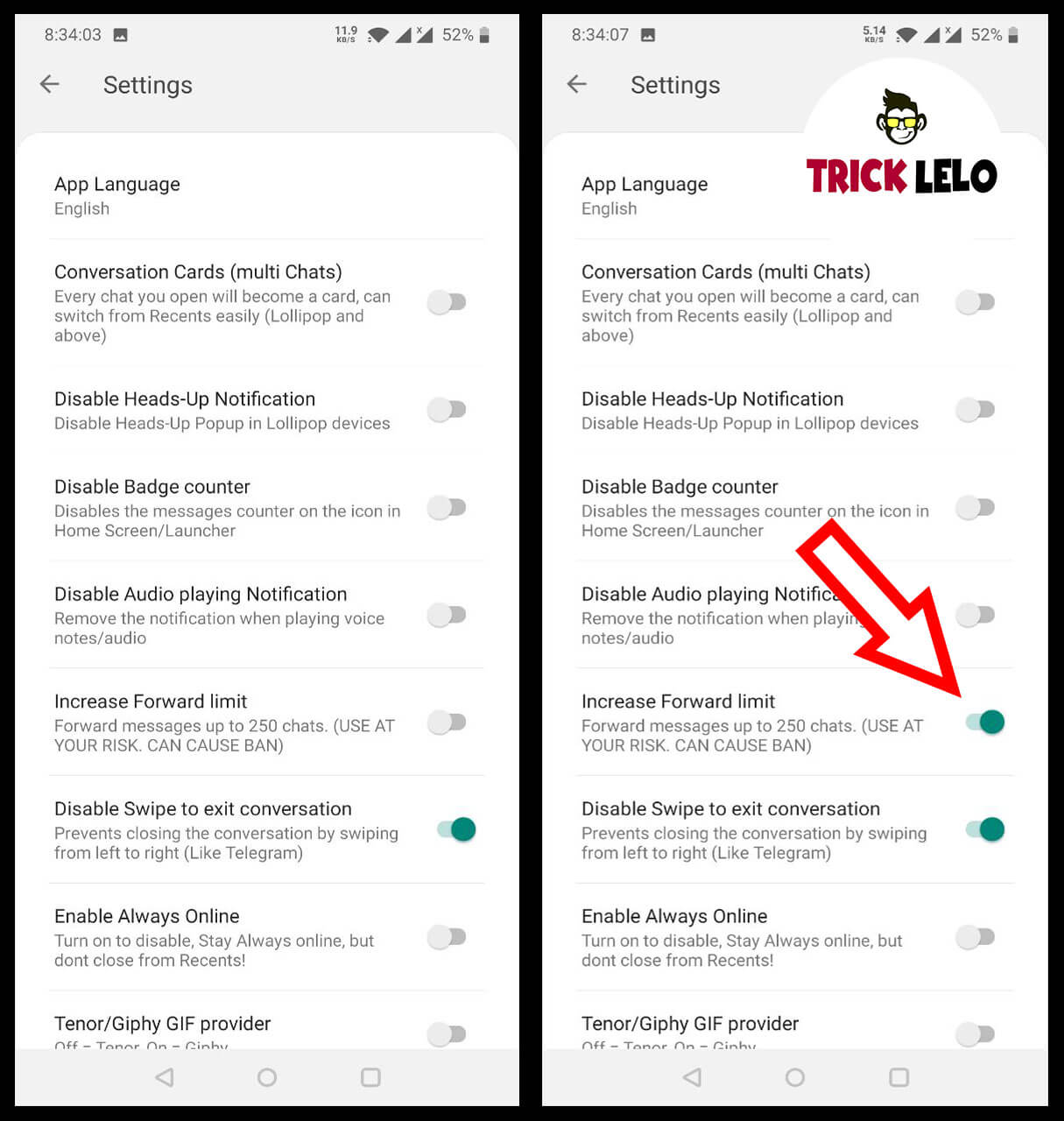
7) Uske Baad 6 Number Par increase Forward Limit “Forward Messages up to 250 chats. ( Use AT Your Risk. Can Cause Ban )” Enable Kar Dijye.

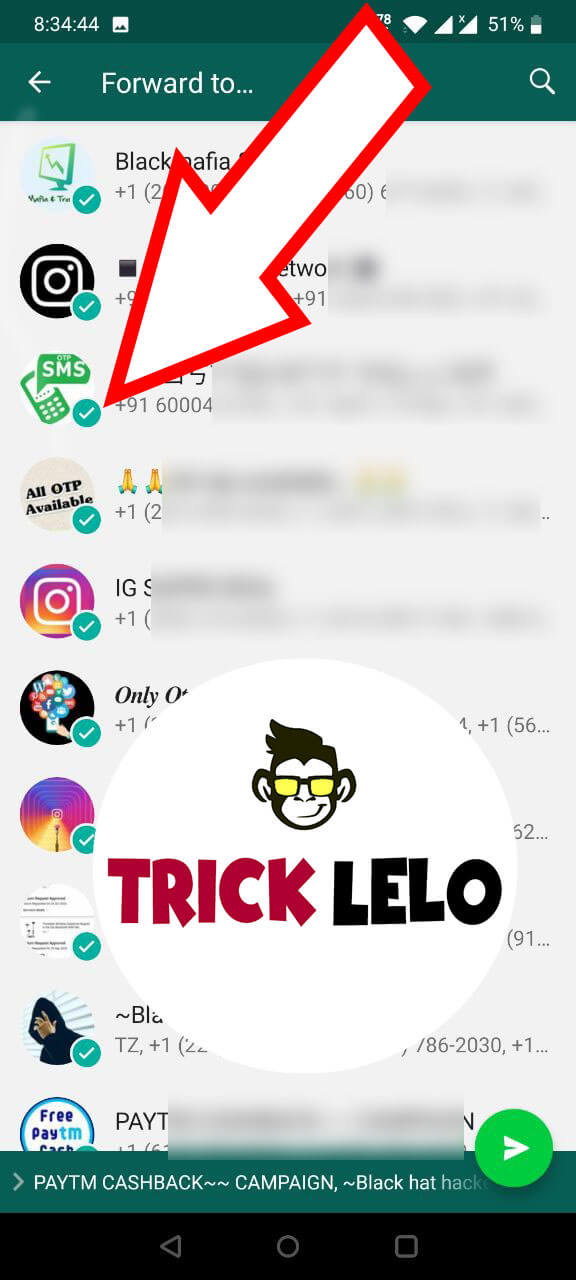
Ab Aap 5 Se Jayda WhatsApp Groups and Contacts Ko Ek Sath Messages Forwad Kar Sakhoge.

How to increase WhatsApp Forward Limit 2021 | WhatsApp Trick

Amazon Quiz Time Answers Today | 24 December 2021

Amazon Quiz Time Contest Answer 24 December 2021

1) Who is the first representative from India to serve as Chairman of the World Steel Association?

Answer: Sajjan Jindal

2) Kushinagar International Airport was recently inaugurated in which Indian state?

Answer: Uttar Pradesh

3) Which country recently launched its first homegrown rocket, Nuri?

Answer: South Korea

4) What book of this author has to do with immortality?

Answer: The picture of Dorian Gray

5) What was the name of this character’s brother in the famous books of Sir Arthur Conan Doyle?

Answer: Mycroft

How to Play Amazon Quiz Time Contest ?

Sign in to the Amazon App. In case you are not signed in, you will be directed to a sign in page.There will be a total of 5 questions. Answer all 5 questions correctly to enter the lucky draw.Getting any question incorrect makes you ineligible for today’s lucky draw. Please try again tomorrow for a new prize.


Amazon Quiz Time Answers Today 10 September 2020

Amazon Quiz Time Answers Today 9 September 2020

Amazon Quiz Time Answers Today 8 September 2020

Amazon Quiz Time Answers Today 6 September 2020

Amazon Quiz Time Answers Today 5 September 2020

Amazon Quiz Time Answers Today 4 September 2020

Amazon Quiz Time Answers Today 3 September 2020

Amazon Quiz Time Answers Today 2 September 2020

Amazon Quiz Time Answers Today 1 September 2020

Eligibility

You need to fulfill the following eligibility criteria to enter the Contest ;

  • (a) You should be an individual legal resident of the Republic of India.
  • (b) You should have set India as your current country in your account settings on Amazon.in
  • (c) You have a billing address within the territory of India.
  • (d) You should be of an age 18 years or above at the time of entry into the Contest and
  • (e) You should have a valid proof of identity and age in the form of a copy of PAN Card / Driving License / Voter ID / Indian passport. Employees of Amazon, their immediate family members (spouses, domestic partners, parents, grandparents, siblings, children and grandchildren), and Amazon’s affiliates, advisors, advertising/Contest agencies are not eligible to enter the Contest.

Details Of The Contest And How To Enter :-

1. This Contest will commence on July 2020 from 08:00:01 a.m. (IST) to 12:00:00 p.m. (IST) (“Contest Period”)

2. In order to be eligible for the Contest, during the Contest Period you must sign-in to or sign-up from an account on the Amazon.in App.

3. Once you have signed-in to the Amazon.in App, you can participate by navigating to the page where 5 questions will be posted during the entire Contest Period.

4. Thereafter, if you answer all the quiz questions correctly, you will be entitled for a lucky draw which will be carried out amongst participants who have answered that particular question correctly.

5. The draw of lots will be carried out during the Contest Period for the questions and a total of 1 participant will be selected as winners by a random draw of lots.

6. The declared winner(s) will be eligible for winning a Redmi Note 8 Pro (hereinafter referred to as “Prize(s)”).

7. Each winner will be eligible for winning one Prize under this Contest only.

After we confirm the winner/s, we will contact the winners individually through email/SMS. We will also post the winners names on this page by 15 june 2020.

Terms And Conditions

This Daily QuizTime is brought to you by Amazon Seller Services Private Limited and made available to you by Amazon Seller Services Private Limited. Please read these terms and conditions before entering the Contest. You agree that, by participating in this Contest, you will be bound by these T&Cs and you acknowledge and agree that you satisfy all Contest eligibility requirements as provided herein below. These T&Cs are in addition to the Amazon.in Conditions of Use to which you agree by using www.amazon.in and its mobile/tablet application or mobile site thereof. To the extent the Amazon.in Conditions of Use are inconsistent with these T&Cs these T&Cs will prevail with respect to the Contest only. For the purposes of these T&Cs, wherever the context so requires “You” or “Your” shall mean any natural person who is

Tag :-

amazon quiz contest today answer,
today’s amazon quiz answers,
amazon quiz answers today,
amazon quiz time today answer,
amazon quiz today,
amazon answers today,
amazon quiz time answers today,
amazon answer today,